


Looking to automate real estate data collection? This guide explains how real estate scraping with ScrapingBot's API lets you extract property listings, sale prices, and market data automatically — in JSON format, updated in real time, from any real estate website. Whether you're new to real estate scraping or looking to scale an existing pipeline, this tutorial covers everything you need.
Table of contents
1. What is real estate scraping?
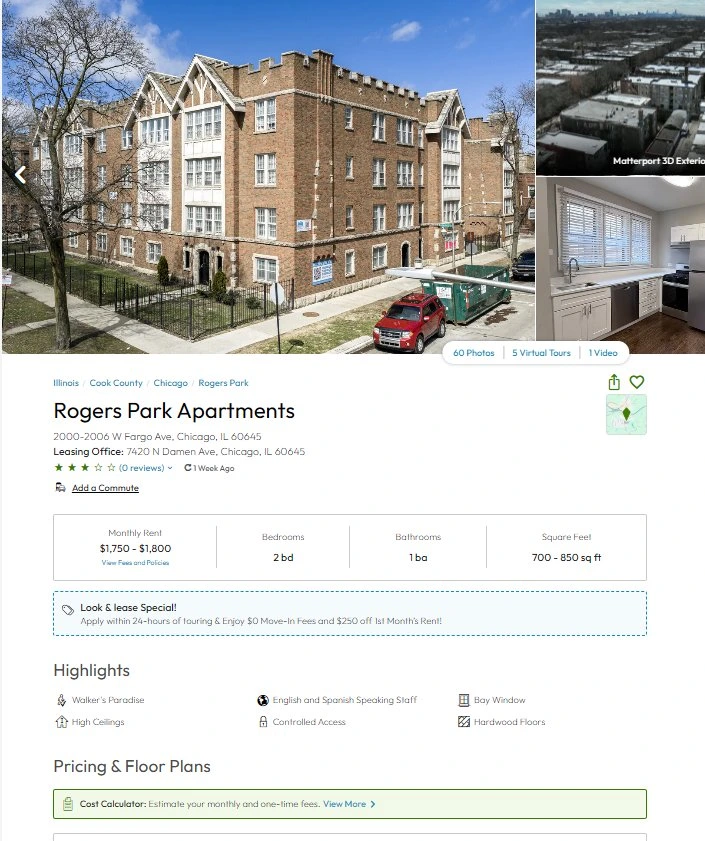
Real estate scraping is the automated extraction of property data from real estate websites — listings, sale prices, surface areas, locations, and availability — using a scraper API. It replaces manual browsing and copy-pasting with a fully automated, reliable, and scalable data pipeline.
Instead of visiting dozens of property websites one by one, a real estate scraper visits them automatically, extracts structured data, and returns it in JSON format ready for analysis, database storage, or integration into your application.
As a result, ScrapingBot is a specialist in automatic data extraction from websites — including the most complex real estate platforms with JavaScript rendering and anti-bot protections.
2. Why automate real estate scraping?
The real estate market moves fast. New properties appear daily, prices change, and listings go offline within hours of being posted. Manual data collection simply cannot keep pace. Here's what automated real estate data extraction gives you:
- Speed — collect hundreds of listings in minutes instead of hours
- Reliability — automatic and reliable data collection, updated as frequently as you need
- Coverage — monitor an entire city or region simultaneously, across multiple platforms
- Time savings — eliminate repetitive browsing and focus on analysis and decision-making
- Up-to-date database — automatically refresh your property database with new listings as soon as they appear on the market
Whether you're a real estate agent, a property investor, a proptech startup, or a data analyst, real estate scraping gives you a decisive competitive advantage.
3. What data can you extract?
A well-configured real estate scraper can extract all the key data points from property listings — houses, apartments, commercial properties, and land:
- Sale or rental price — current listing price, price per m², price history
- Property details — surface area, number of rooms, bedrooms, bathrooms, floor
- Location data — address, city, neighborhood, ZIP code, GPS coordinates
- Listing date — when the property first appeared on the market
- Agency or seller — contact details of the listing agent
- Property description — full text description for NLP analysis
- Photos — image URLs for visual processing pipelines
All of this data is returned in structured JSON format, ready to be imported into your real estate database, CRM, or analytics platform.
4. ScrapingBot: specialist in real estate scraping
ScrapingBot is a specialist in automatic data extraction from websites, with a dedicated Real Estate API that handles the technical complexity for you: JavaScript rendering, IP rotation, CAPTCHA bypass, and structured JSON output — regardless of the source platform.
Moreover, the same API works across all major real estate platforms — property portals, agency websites, auction sites, and classifieds. Authentication is via a single API key, and integration into your existing Python workflow takes just a few lines of code.
Indeed, we've already covered scraping Funda in the Netherlands and Rightmove in the UK — the same API interface applies to any real estate website globally.
5. Real estate scraping: step-by-step Python tutorial
Install the library
pip install requests pandasThe requests library handles API calls. pandas is used to structure and export your property database.
Basic setup
import requests

USERNAME = "your_username"
API_KEY  = "your_api_key"

def scrape_property(url):
    api_url = "https://api.scraping-bot.io/scrape/real-estate"
    payload = {"url": url}
    response = requests.post(api_url, json=payload, auth=(USERNAME, API_KEY))
    if response.status_code == 200:
        return response.json()
    else:
        raise Exception(f"Error {response.status_code}: {response.text}")
Scraping new listings from a city
To monitor new properties for sale in a specific city and automatically update your database, loop through listing pages with a polite delay:
import requests, time

SEARCH_URL = "https://www.example-realestate.com/for-sale/paris/"

def scrape_listings(n_pages=5):
    results = []
    for page in range(1, n_pages + 1):
        url = f"{SEARCH_URL}?page={page}"
        data = scrape_property(url)
        listings = data.get("listings", [])
        results.extend(listings)
        print(f"Page {page}: {len(listings)} properties found")
        time.sleep(1)
    return results
Automating and refreshing your property database
To keep your real estate database up to date automatically, schedule your scraper to run daily and detect new listings:
import sqlite3, schedule, time
from datetime import datetime

def save_listing(listing):
    conn = sqlite3.connect("real_estate.db")
    cursor = conn.cursor()
    cursor.execute("""
        CREATE TABLE IF NOT EXISTS properties (
            id INTEGER PRIMARY KEY AUTOINCREMENT,
            title TEXT, price REAL, surface_m2 REAL,
            rooms INTEGER, city TEXT, url TEXT UNIQUE, scraped_at TEXT
        )
    """)
    try:
        cursor.execute("""
            INSERT INTO properties (title, price, surface_m2, rooms, city, url, scraped_at)
            VALUES (?, ?, ?, ?, ?, ?, ?)
        """, (
            listing.get("title"), listing.get("price"),
            listing.get("surface_m2"), listing.get("rooms"),
            listing.get("city"), listing.get("url"),
            datetime.utcnow().isoformat()
        ))
        conn.commit()
    except sqlite3.IntegrityError:
        pass
    finally:
        conn.close()

def daily_scrape():
    listings = scrape_listings(n_pages=10)
    for listing in listings:
        save_listing(listing)

schedule.every().day.at("08:00").do(daily_scrape)
while True:
    schedule.run_pending()
    time.sleep(60)
6. Sample JSON output
ScrapingBot's real estate scraping API returns a structured JSON object for each property. Here's a typical response:
{
  "title": "3-bedroom apartment, city center",
  "price": 385000,
  "currency": "EUR",
  "surface_m2": 78,
  "price_per_m2": 4936,
  "rooms": 4,
  "city": "Paris",
  "zip_code": "75011",
  "listing_date": "2026-04-15",
  "scraped_at": "2026-04-21T08:00:00Z"
}| Field | Example value | Type |
|---|---|---|
| title | 3-bedroom apartment, city center | string |
| price | 385000 | float |
| currency | EUR | string |
| surface_m2 | 78 | float |
| price_per_m2 | 4936 | float |
| rooms | 4 | integer |
| city | Paris | string |
| zip_code | 75011 | string |
| listing_date | 2026-04-15 | string |
| scraped_at | 2026-04-21T08:00:00Z | string |
7. Key use cases for real estate scraping
Once your real estate data extraction pipeline is running, the data unlocks a wide range of high-value applications:
- Property price comparison — compare sale prices across neighborhoods to identify undervalued listings
- New listing alerts — automatically detect new properties as soon as they appear, before the competition
- Automated property database — build and maintain a comprehensive, always up-to-date database
- Price trend analysis — track price evolution over time by city, ZIP code, or property type
- Market intelligence — monitor supply and demand dynamics and price-per-m² benchmarks
- Investment opportunity detection — identify properties priced below market value
8. Going further: automated property monitoring
Visualization and alerts
Once your real estate scraping pipeline is running, you can plug the JSON output into a Plotly dashboard to visualize price trends by city or neighborhood. Furthermore, you can connect it to a notification system to alert you instantly when a new property matching your criteria appears on the market.
Scaling to multiple markets
For large-scale deployments across multiple cities or countries, ScrapingBot's API scales effortlessly — the same interface handles hundreds of thousands of listings per day. Additionally, ScrapingBot supports e-commerce price scraping, email extraction, and social media data collection with the same unified API.
Ready to automate your real estate data collection? Get 500 free API calls when you sign up for ScrapingBot.
Try ScrapingBot for free →