



Apartments.com Scraper: Extract Real Estate Data via API
ScrapingBot's Apartments.com scraper API lets you extract structured real estate data in just a few API calls. Collect apartment listings, pricing, availability, reviews, amenities, and much more — without writing a custom parser or managing proxies yourself.
Table of contents
Why use an Apartments.com scraper API?
Apartments.com is one of the largest rental listing platforms in the United States. It covers thousands of cities and provides detailed data on each listing — including price, location, photos, tenant reviews, and building amenities.
However, accessing this data at scale is not possible through the website alone. That's where an Apartments.com scraper API comes in. By extracting data from Apartments.com, you can:
- Track rental price trends across cities and neighborhoods
- Identify investment opportunities before they become widely known
- Build comparison tools or rental market dashboards
- Enrich your CRM or data warehouse with up-to-date listing data
- Automate competitive intelligence for property managers
A rich data source for real estate professionals
In addition to basic listing details, Apartments.com provides neighborhood descriptions and nearby schools. Moreover, it includes transportation scores, points of interest, and tenant reviews.
As a result, the data goes well beyond a simple price list. It gives you a full picture of each property and its surroundings — which is exactly what makes this API valuable for data-driven decisions.
Example of a listing page on Apartments.com
Who is this API for?
Our Apartments.com scraper is useful for a wide range of users. In particular, it fits well for:
- Real estate investors — monitor price trends and spot undervalued opportunities
- Property managers — benchmark your listings against the competition
- Data analysts — build rental market datasets for research or reporting
- Developers — integrate real estate data into apps, dashboards, or tools
- Proptech startups — power your product with live market data
How the Apartments.com scraper API works
ScrapingBot's Real Estate API handles the hard work for you: it renders JavaScript, rotates proxies, and solves CAPTCHAs automatically. You simply pass the Apartments.com listing URL, and the API returns clean, structured JSON data.
What the scraper collects
For each Apartments.com listing page, the API extracts the following categories of data:

Key listing data — monthly rent, bedrooms, bathrooms and surface area extracted in a single API call
| Category | Data extracted |
|---|---|
| Listing basics | Title, description, price range, surface area, bedrooms, bathrooms |
| Location | Address, city, state, postal code, neighborhood name and description |
| Pricing details | Monthly rent, deposit, available units with individual prices and availability dates |
| Amenities | Community features, apartment features, categorized by type |
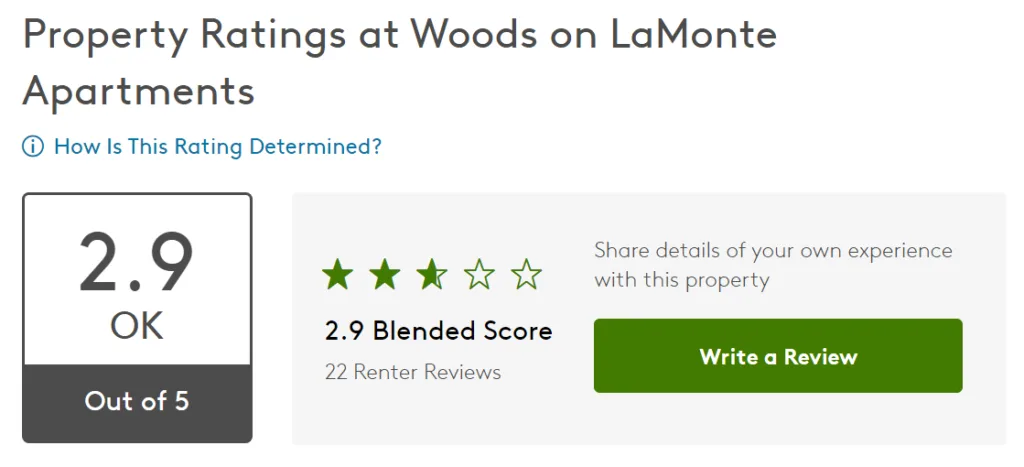
| Reviews & ratings | Star rating, review count, individual reviews with property manager responses |
| Media | Photos, virtual tours, videos — organized by gallery category |
| Education | Nearby schools and colleges with distance and travel time |
| Transportation | Walk score, transit score, nearby transport options |
| Points of interest | Nearby restaurants, parks, shops with distance and travel time |
| Nearby listings | Similar apartments with price range and distance |
| FAQ | Frequently asked questions and answers from the listing page |
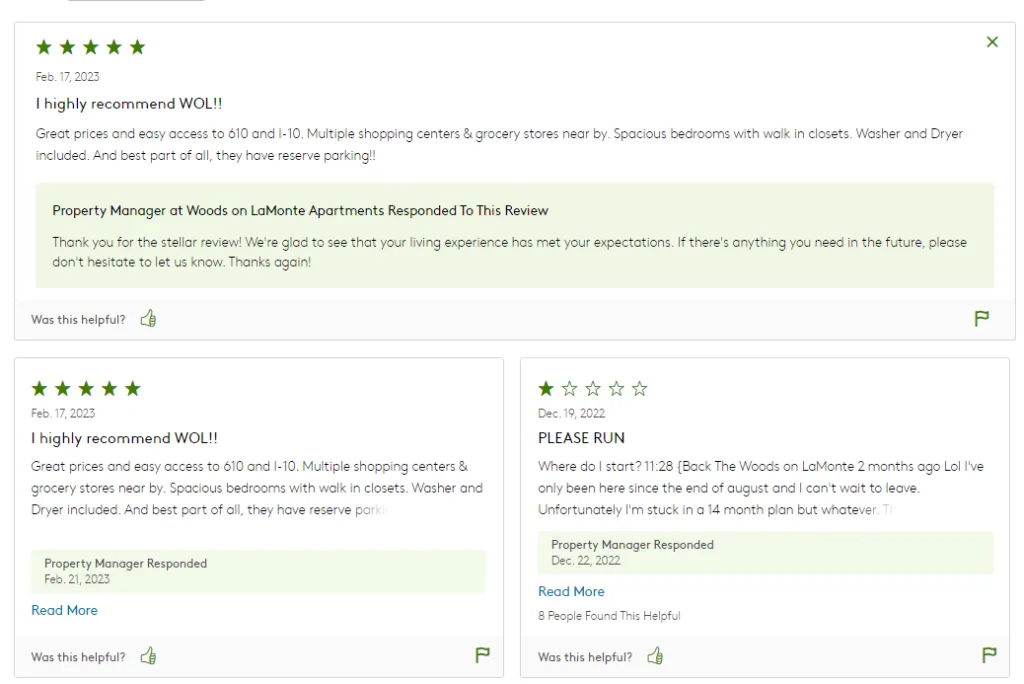
Tenant reviews and property manager responses — all extractable via the reviews API fields

Overview of the data returned by the API for a single listing
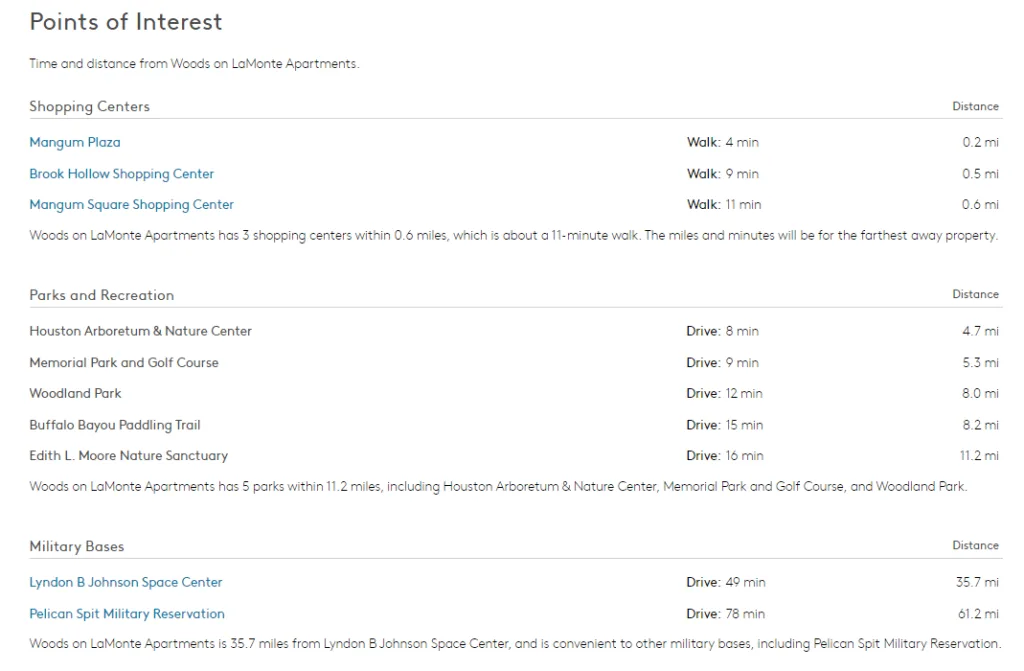
Points of interest with travel time and distance — extracted via the pointOfInterest API fields
Apartments.com scraper API response: key fields explained
The API returns a structured JSON object. Here is a simplified example with the most useful fields:
{
  "title": "Woods on LaMonte Apartments",
  "description": "A quiet community in the Garden Oaks neighborhood...",
  "monthlyRent": "$1,200 - $2,400",
  "numberOfBedrooms": "1 - 3 bd",
  "numberOfBathrooms": "1 - 2.5 ba",
  "surfaceArea": "650 - 1,200",
  "surfaceAreaUnit": "sqft",
  "postalCode": "77092",
  "city": "Houston",
  "state": "TX",
  "road": "LaMonte Lane",
  "rating": {
    "value": 2.9,
    "total": 5,
    "reviewsCount": 22
  },
  "marketedBy": {
    "phoneNumber": "(571) 741-4115",
    "todaysHours": "9am - 6pm"
  },
  "pricing": [
    {
      "name": "1 Bedroom",
      "rent": "$1,200",
      "deposit": "$500",
      "numberOfBedrooms": "1",
      "numberOfBathrooms": "1",
      "surfaceArea": "650 sqft",
      "AvailableUnits": [
        {
          "unit": "A101",
          "price": "$1,200",
          "availability": "2024-06-01"
        }
      ]
    }
  ],
  "reviews": [
    {
      "stars": 4,
      "publishingDate": "2024-01-15",
      "title": "Great location",
      "review": "Close to everything, quiet neighborhood.",
      "propertyManagerResponse": "Thank you for your feedback!"
    }
  ],
  "transportation": {
    "scores": [
      { "name": "Walk Score", "score": 57, "total": 100 },
      { "name": "Bike Score", "score": 54, "total": 100 }
    ]
  }
}
Key fields reference
Here are the most commonly used fields and what they contain:
| Field | Description |
|---|---|
monthlyRent | Range of monthly rent for the building |
pricing[].AvailableUnits | Individual units with price, area, and availability date |
rating.value | Overall building rating out of 5 |
rating.reviewsCount | Total number of tenant reviews |
reviews[].review | Full text of each tenant review |
amenities.communityAmenities | Building-level features (pool, gym, parking…) |
amenities.apartmentAmenities | Unit-level features (dishwasher, A/C, balcony…) |
transportation.scores | Walk score, bike score, transit score |
education.schools | Nearby public and private schools with ratings |
nearby[].priceRange | Price range of similar apartments nearby |
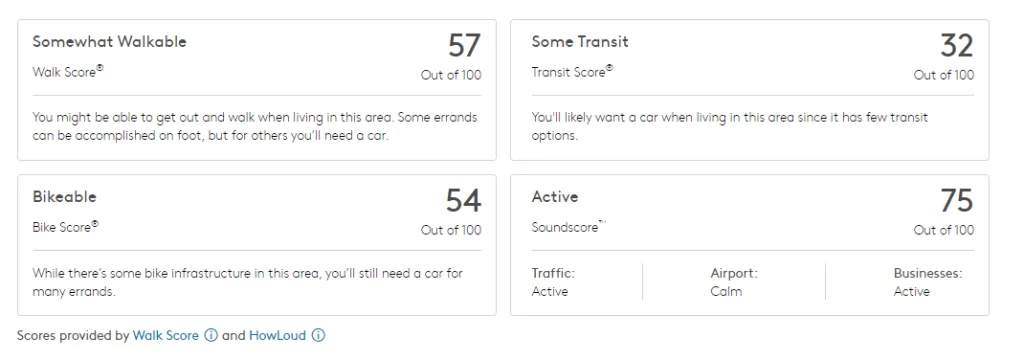
Walk Score, Transit Score and Bike Score — extracted via the transportation.scores API fields
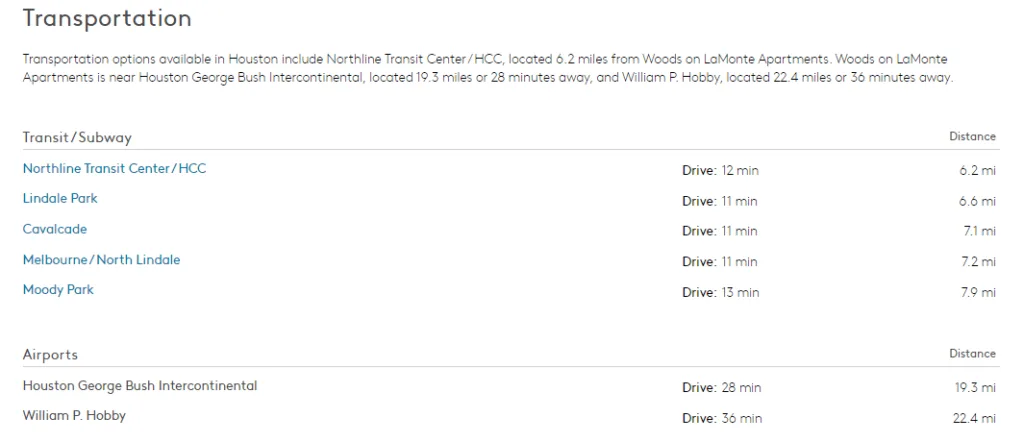
Transit options and airports with travel time — extracted via the transportation.transport API fields
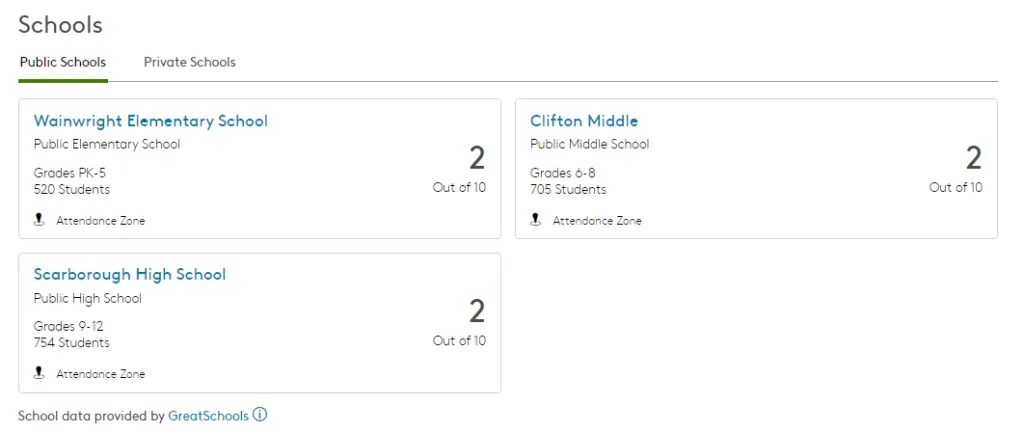
Nearby public and private schools with ratings — extracted via the education.schools API fields
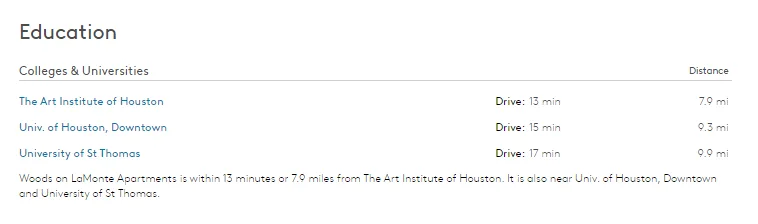
Nearby colleges and universities with travel time — extracted via the education.colleges API fields
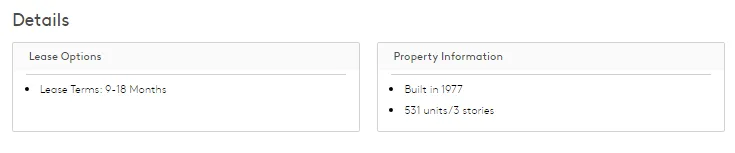
Lease options and property details — extracted via the fees and property info API fields
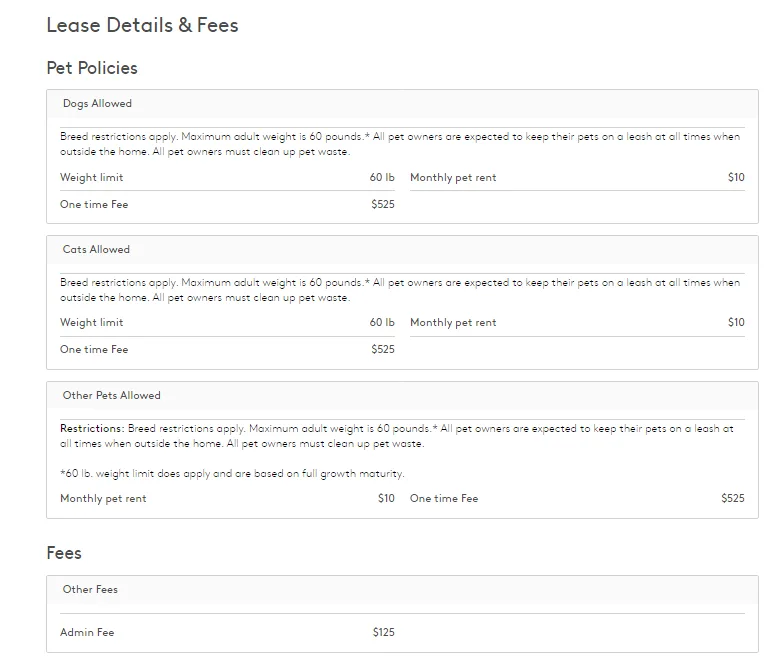
Lease details, pet policies and fees — extracted via the fees.feesPolicies API fields
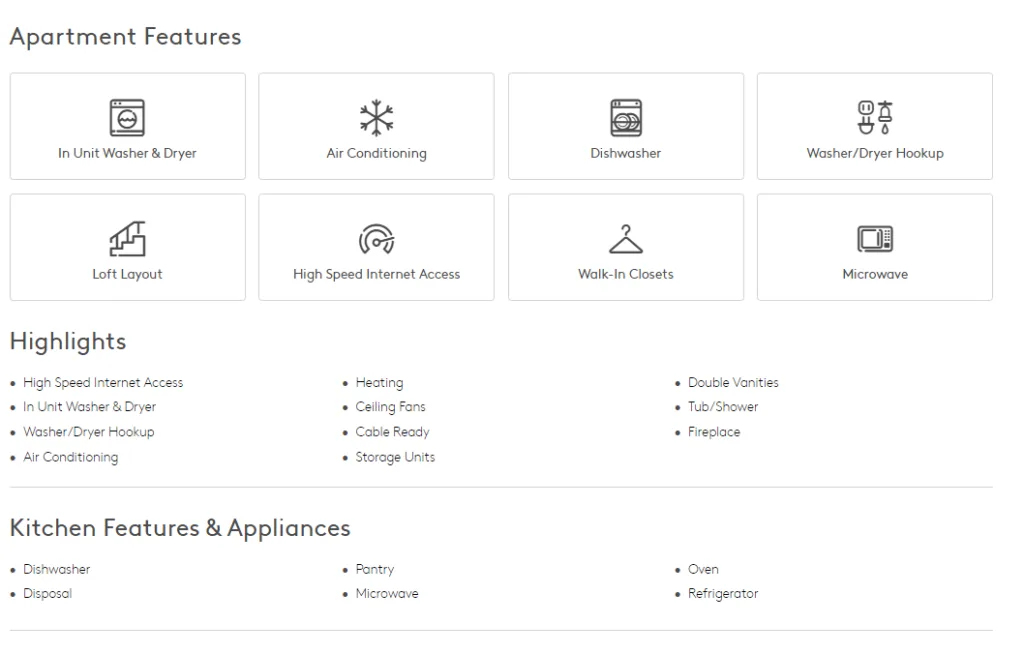
Apartment features and amenities — extracted via the amenities.apartmentAmenities API fields
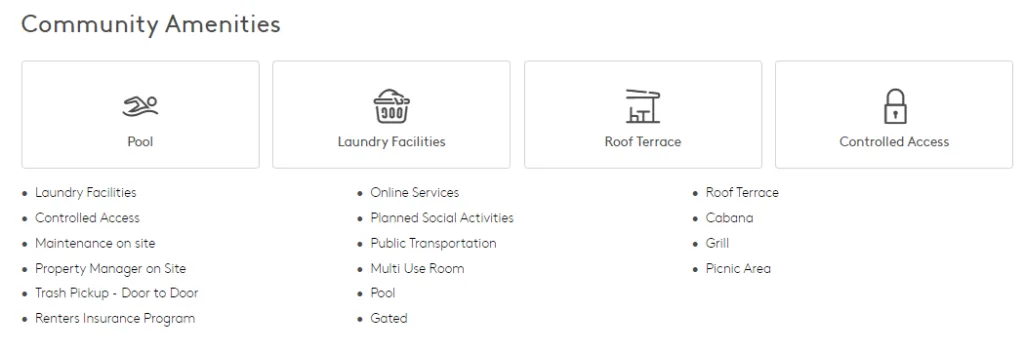
Community amenities — extracted via the amenities.communityAmenities API fields
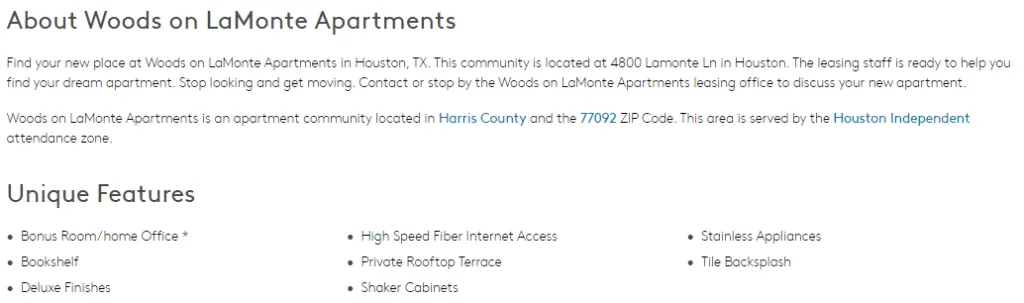
About section and unique features — extracted via the about.description and about.uniqueFeatures API fields
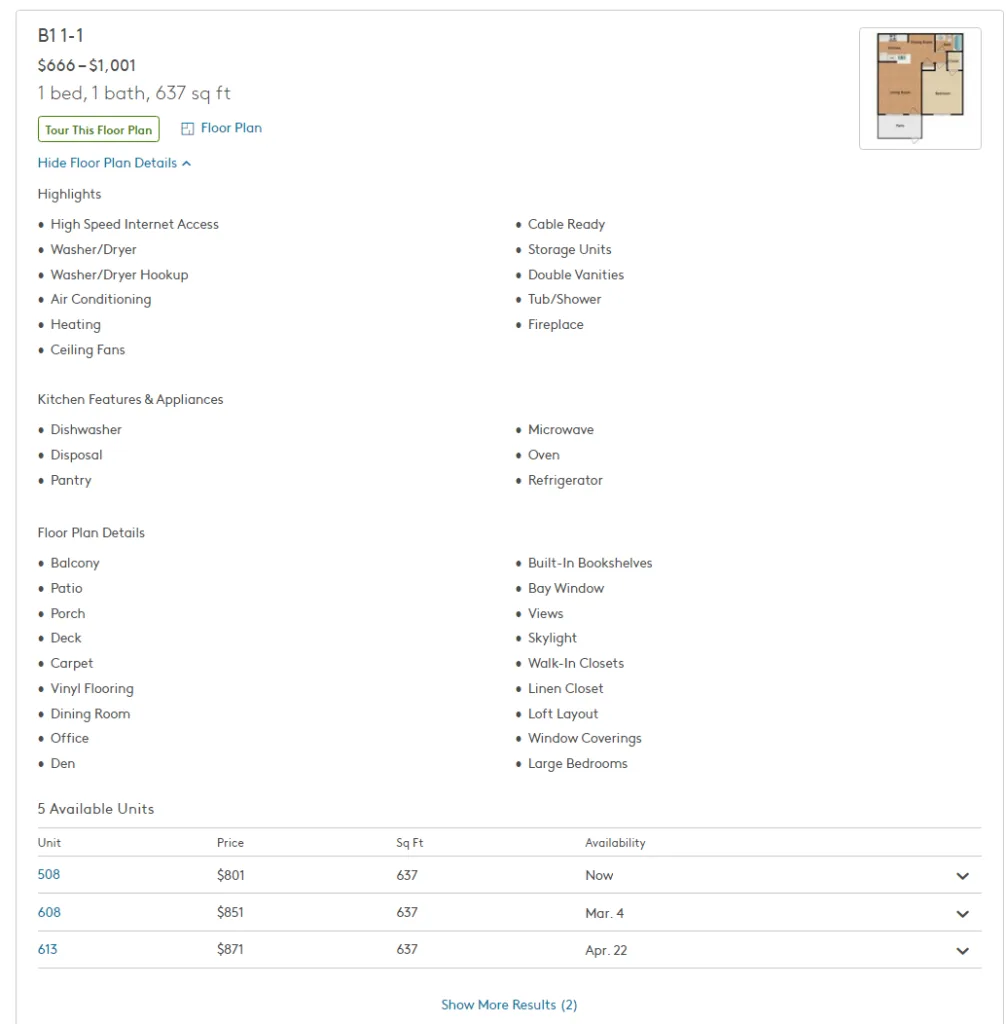
Floor plan details with available units, prices and availability dates — extracted via the pricing.AvailableUnits API fields
The API returns clean JSON — no parsing or cleaning required
Code example
Getting started takes just a few lines of code. Below is an example in Python using the Real Estate API endpoint:
import requests

USERNAME = "your_username"
API_KEY  = "your_api_key"

url = "https://api.scraping-bot.io/scrape/real-estate"

payload = {
    "url": "https://www.apartments.com/woods-on-lamonte-houston-tx/",
    "realEstateOptions": {
        "city": "Houston"
    }
}

response = requests.post(
    url,
    json=payload,
    auth=(USERNAME, API_KEY)
)

data = response.json()

print(data["title"])        # "Woods on LaMonte Apartments"
print(data["monthlyRent"])  # "$1,200 - $2,400"
print(data["rating"])       # {"value": 2.9, "total": 5, "reviewsCount": 22}
Available SDKs
In addition to Python, ScrapingBot provides official SDKs for Node.js, PHP, and Java. Furthermore, you can use raw HTTP calls from any language or tool that supports REST APIs.
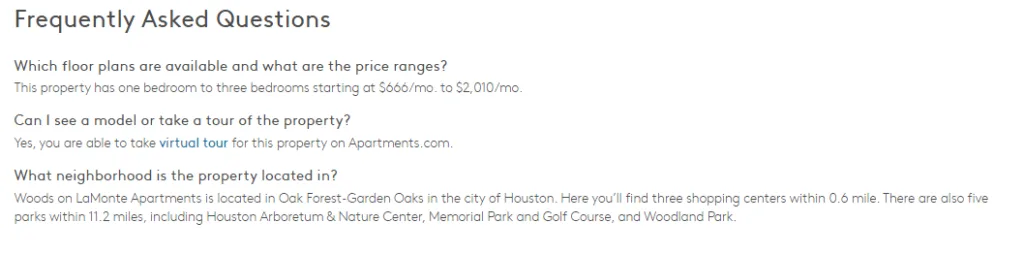
The API integrates cleanly into any data pipeline or backend application
Pricing
ScrapingBot uses a credit-based pricing model. Each API call consumes a set number of credits depending on the endpoint and options used. In addition, all plans include access to the full Real Estate API feature set.
Available plans
| Plan | Credits/month | Price |
|---|---|---|
| Free | 100 | €0 |
| Starter | 5,000 | €39/mo |
| Pro | 25,000 | €99/mo |
| Business | 100,000 | €299/mo |
| Enterprise | 500,000+ | €699/mo |
Moreover, the free tier includes 100 credits every month — enough to run tests and validate your use case before committing to a paid plan.
Ready to start using our Apartments.com scraper API? Get 100 free API credits every month — no credit card required.
Try ScrapingBot for free →