

Understanding web scraping vs crawling is essential for any developer who wants to collect data from the web. Both techniques are widely used in Python and JavaScript projects, yet they serve very different purposes. This guide explains how each one works and how to implement them with practical code examples — using libraries like requests, BeautifulSoup, and Playwright.
Table of contents
1. Web scraping vs crawling: the key difference
The web contains billions of public pages: product prices, news articles, job listings, weather data, sports results… Rather than copying this information by hand, developers automate the process using either web crawling or web scraping. Understanding the difference between the two is the first step to choosing the right tool for your project.
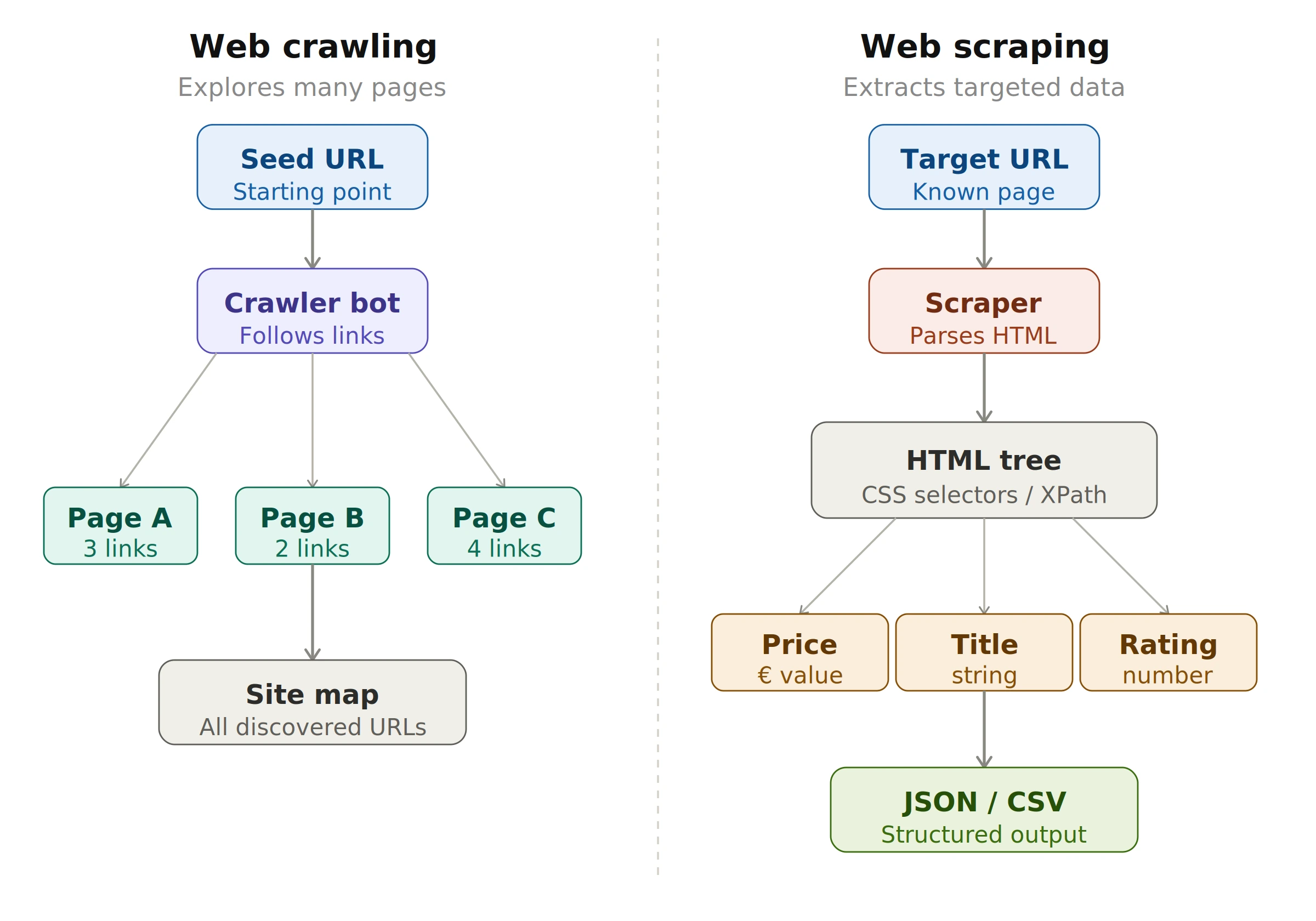
Web scraping vs crawling: crawling maps the site following links, scraping extracts targeted fields from a specific page.
In short: web crawling is about discovery and navigation across many pages, while web scraping is about extracting specific data from targeted pages. Let's look at each in detail.
2. What is web crawling? A web scraping vs crawling guide
A web crawler (also called a spider or bot) is a program that automatically navigates from page to page by following hyperlinks. This is exactly how search engines like Google index the web — they deploy crawlers that continuously discover and map new pages.
How web crawling works — step by step
- Seed URL — One or more starting URLs are added to a queue.
- Download — The crawler fetches the HTML of the page via an HTTP GET request.
- Link extraction — All
<a href="...">links are extracted and added to the queue if not yet visited. - Deduplication — A set of already-visited pages prevents infinite loops.
- Repeat — The process continues until the queue is empty or a defined limit is reached.
Python example — Basic web crawler
import requests
from bs4 import BeautifulSoup
from urllib.parse import urljoin, urlparse
from collections import deque

def crawler(seed_url, max_pages=20):
    # Queue and set of visited pages
    queue   = deque([seed_url])
    visited = set()

    while queue and len(visited) < max_pages:
        url = queue.popleft()

        if url in visited:
            continue

        try:
            response = requests.get(url, timeout=5)
            visited.add(url)
            print(f"Crawled: {url}")

            soup = BeautifulSoup(response.text, "html.parser")

            # Extract all links from the page
            for tag in soup.find_all("a", href=True):
                link = urljoin(url, tag["href"])
                # Stay within the same domain
                if urlparse(link).netloc == urlparse(seed_url).netloc:
                    if link not in visited:
                        queue.append(link)

        except Exception as e:
            print(f"Error on {url}: {e}")

    return visited

# Start the crawler
pages = crawler("https://example.com", max_pages=50)
print(f"\n{len(pages)} pages crawled.")
JavaScript (Node.js) example — Basic web crawler
const axios   = require("axios");
const cheerio = require("cheerio");
const { URL } = require("url");

async function crawler(seedUrl, maxPages = 20) {
  const queue   = [seedUrl];
  const visited = new Set();
  const origin  = new URL(seedUrl).hostname;

  while (queue.length > 0 && visited.size < maxPages) {
    const url = queue.shift();
    if (visited.has(url)) continue;

    try {
      const { data } = await axios.get(url, { timeout: 5000 });
      visited.add(url);
      console.log(`Crawled: ${url}`);

      const $ = cheerio.load(data);

      // Extract all links
      $("a[href]").each((_, el) => {
        try {
          const link = new URL($(el).attr("href"), url);
          if (link.hostname === origin && !visited.has(link.href)) {
            queue.push(link.href);
          }
        } catch (_) {}
      });
    } catch (err) {
      console.log(`Error: ${url} — ${err.message}`);
    }
  }

  return visited;
}

crawler("https://example.com", 50)
.then(pages => console.log(`\n${pages.size} pages crawled.`));Python:
pip install requests beautifulsoup4Node.js:
npm install axios cheerio
Web crawling use cases
- Indexing websites for search engines
- Collecting data for large-scale analysis
- Generating reports on website structure and content
- Analyzing competitor websites for SEO purposes
- Monitoring website changes for SEO and security
3. What is web scraping? Key differences from crawling
Web scraping — the second technique in our web scraping vs crawling comparison — focuses on extracting specific, structured data from one or more targeted pages. You already know what you're looking for: a price, a product name, a job title, a table of results.
Web scraping core principle: HTML parsing
Every web page is a tree of HTML tags. A web scraper navigates this tree using CSS selectors or XPath to pinpoint and extract the exact elements needed. You can learn more about CSS selectors in the MDN Web Docs.
Inspect. In the DevTools panel, right-click the highlighted tag → Copy → Copy selector.
Python example — Article scraper
import requests
from bs4 import BeautifulSoup
import json

def scrape_articles(url):
    headers = {
        "User-Agent": "Mozilla/5.0 (compatible; MyScraper/1.0)"
    }

    response = requests.get(url, headers=headers, timeout=10)
    response.raise_for_status()  # raises an error on HTTP 4xx/5xx

    soup = BeautifulSoup(response.text, "html.parser")

    articles = []
    # Target <article> tags on the page
    for item in soup.select("article"):
        title   = item.select_one("h2, h3")
        link    = item.select_one("a[href]")
        excerpt = item.select_one("p")

        articles.append({
            "title"  : title.get_text(strip=True)   if title   else None,
            "url"    : link["href"]                  if link    else None,
            "excerpt": excerpt.get_text(strip=True)  if excerpt else None,
        })

    return articles

# Save to JSON
data = scrape_articles("https://example-news.com")
with open("articles.json", "w", encoding="utf-8") as f:
    json.dump(data, f, ensure_ascii=False, indent=2)

print(f"{len(data)} articles extracted.")
JavaScript (Node.js) example — Article scraper
const axios   = require("axios");
const cheerio = require("cheerio");
const fs      = require("fs");

async function scrapeArticles(url) {
  const { data } = await axios.get(url, {
    headers: { "User-Agent": "Mozilla/5.0 (compatible; MyScraper/1.0)" },
    timeout: 10000
  });

  const $        = cheerio.load(data);
  const articles = [];

  // Target <article> tags
  $("article").each((_, el) => {
    const title   = $(el).find("h2, h3").first().text().trim();
    const link    = $(el).find("a[href]").first().attr("href");
    const excerpt = $(el).find("p").first().text().trim();

    articles.push({ title, link, excerpt });
  });

  return articles;
}

scrapeArticles("https://example-news.com").then(data => {
  fs.writeFileSync("articles.json", JSON.stringify(data, null, 2));
  console.log(`${data.length} articles extracted.`);
});
Web scraping use cases
- Price monitoring for e-commerce and retail
- Market research and competitor analysis
- Collecting training data for machine learning models
- Lead generation for sales and marketing teams
- News aggregation for media websites
4. Web scraping vs crawling on dynamic websites
A key challenge — in both web scraping and crawling — is dealing with modern websites that load their content via JavaScript after the initial page load (React, Vue, Angular…). In those cases, requests or axios only retrieve an empty HTML shell with no actual data.
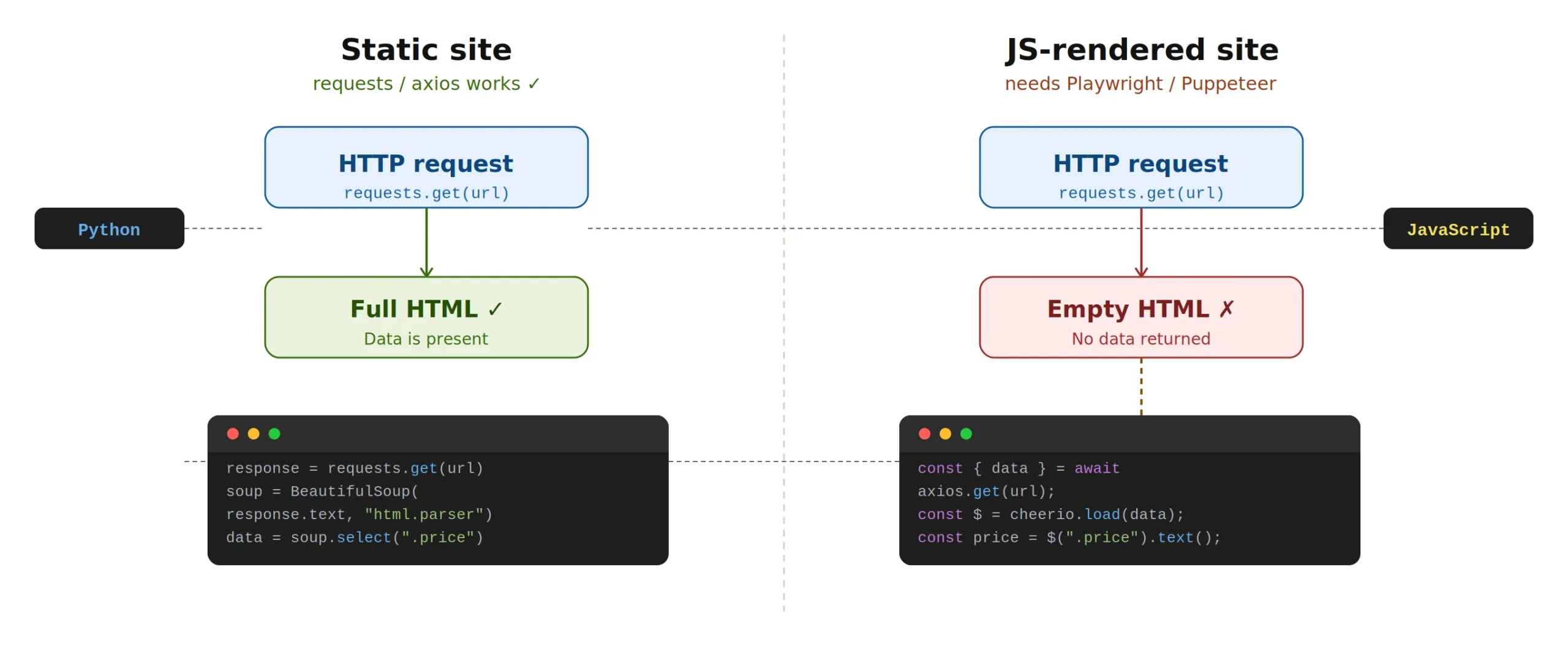
When web scraping vs crawling dynamic pages, a simple HTTP request returns an empty shell — use Playwright or Puppeteer to render JavaScript first.
Python solution — Playwright
from playwright.sync_api import sync_playwright

with sync_playwright() as p:
    # Launch a headless Chromium browser (invisible)
    browser = p.chromium.launch(headless=True)
    page    = browser.new_page()

    page.goto("https://example-js-site.com")

    # Wait for a specific element to appear
    page.wait_for_selector(".product-card")

    # Extract data via evaluate (runs JavaScript in the browser)
    products = page.evaluate("""() => {
        return [...document.querySelectorAll('.product-card')]
            .map(el => ({
                name  : el.querySelector('h2')?.innerText,
                price : el.querySelector('.price')?.innerText,
            }));
    }""")

    for product in products:
        print(product)

    browser.close()

# Install: pip install playwright && playwright install chromium
JavaScript solution — Puppeteer
const puppeteer = require("puppeteer");

(async () => {
  const browser = await puppeteer.launch({ headless: "new" });
  const page    = await browser.newPage();

  await page.goto("https://example-js-site.com");

  // Wait for a selector to appear in the DOM
  await page.waitForSelector(".product-card");

  // Extract data via evaluate (runs in the browser context)
  const products = await page.evaluate(() => {
    return [...document.querySelectorAll(".product-card")].map(el => ({
      name : el.querySelector("h2")?.innerText,
      price: el.querySelector(".price")?.innerText,
    }));
  });

  console.log(products);
  await browser.close();
})();

// Install: npm install puppeteer
5. Web scraping vs crawling: side-by-side comparison
Now that we've covered both techniques, here is a full side-by-side summary to help you choose the right approach for your project.
| Criterion | Web Crawling | Web Scraping |
|---|---|---|
| Goal | Discover & map pages | Extract specific data |
| Scope | Multiple pages (entire site) | One or a few targeted pages |
| Complexity | Easier to automate | Requires HTML analysis |
| Key libraries | requests, axios |
BeautifulSoup, cheerio, Playwright |
| Typical use case | SEO indexing, site audit | Price monitoring, leads, market research |
| JS-rendered sites | Not usually needed | Yes — use Playwright or Puppeteer |
6. Essential best practices for web scraping and crawling
Respect the robots.txt file
Found on most websites at /robots.txt, this file specifies which pages a bot is allowed to visit. Ignoring it can result in being blocked or facing legal consequences. Read more in Google's robots.txt documentation.
Rate-limit your requests
Always add a delay between requests to avoid overloading the target server. In Python: time.sleep(1), in JavaScript: await new Promise(r => setTimeout(r, 1000)).
Set a proper User-Agent
Identify your bot in the User-Agent header, or use a real browser string if needed to access content. Never misrepresent your bot as a human user in bad faith.
Check the Terms of Service
Before starting any web scraping or crawling project, read the website's Terms of Service. Some sites explicitly prohibit automated data extraction.
Prefer official APIs when available
If the site offers a public API (Twitter/X, OpenWeatherMap, Reddit…), use it — it's more stable, legal, and often more efficient than scraping.
7. Tools ecosystem for web scraping and crawling
Python
- requests — Simple, reliable HTTP requests
- BeautifulSoup4 — HTML/XML parsing with CSS selectors
- Scrapy — Full-featured, high-performance scraping framework
- Playwright — Browser automation for JavaScript-rendered sites
- Selenium — Widely-used alternative to Playwright
- pandas — Processing and exporting collected data to CSV, Excel, etc.
JavaScript / Node.js
- axios — Promise-based HTTP client
- cheerio — Server-side HTML parsing (jQuery-like API)
- Puppeteer — Headless Chrome/Chromium control
- Playwright — Multi-browser support (Chrome, Firefox, Safari)
- node-fetch — Lightweight native HTTP client
8. Scale your web scraping and crawling with ScrapingBot
Building a web scraper or crawler from scratch works well for simple projects, but as soon as you target sites with anti-bot protection, IP rate limiting, or JavaScript rendering, things get complex fast. That's exactly what ScrapingBot is designed to handle.
ScrapingBot's API automatically rotates IPs, renders JavaScript, bypasses CAPTCHAs, and returns clean structured JSON — so you can focus on using your data, not fighting to collect it. Whether you're doing web scraping or crawling, it supports major platforms including real estate portals, e-commerce sites, social networks, and more.
Ready to scale your web scraping and crawling? Get 1,000 free API calls when you sign up for ScrapingBot — no credit card required.
Try ScrapingBot for free →