
How to scrape product listings from Walmart?
· Updated April 24, 2026 · 5 min read
Walmart Scraper
Walmart's product catalog is a goldmine for price intelligence, inventory monitoring, and competitive analysis. This guide walks you through the technical realities of scraping Walmart product pages at scale — anti-bot mechanisms, JavaScript rendering, response parsing — and shows how ScrapingBot's Retail API handles them for you.
Table of contents
1. Why scrape Walmart?
Walmart is North America's largest retailer — both in physical stores and online. With tens of millions of product listings across every category, its product pages are a reference point for pricing strategy, stock monitoring, and market trend analysis. Scraping Walmart gives developers and data teams access to:
- Real-time pricing and promotional discount detection
- Stock availability and shipping option data by location
- Product metadata: EAN13, ASIN, brand, category hierarchy
- Customer ratings and review volume for sentiment analysis
- Image URLs and product descriptions for catalog enrichment
- Price history tracking across seasonal events (Black Friday, back-to-school, etc.)
Even a 2–3% price difference on a high-volume SKU can shift significant purchase volume. Automated price monitoring through scraping is how competitive retailers stay ahead.
2. Technical challenges
Walmart actively protects its product data. If you've tried scraping it directly, you've already run into most of these:
- Aggressive bot detection — Walmart fingerprints browser environments. Headless Chromium with default settings is blocked almost immediately. Even curl requests with crafted headers fail at scale.
- JavaScript-rendered content — Core product data (price, availability, shipping fees) is injected by React after initial page load. A raw HTTP GET returns a skeleton HTML with no useful data.
- IP rate limiting and geo-restrictions — Walmart serves different prices and availability depending on the user's ZIP code. Too many requests from one IP trigger CAPTCHAs or silent data degradation.
- Session tokens and cookies — Some data endpoints require a valid session cookie chain, making stateless scraping unreliable.
- Dynamic URL structures — Product URLs follow the pattern
/ip/[slug]/[numeric-id], but internal API calls use a separate item ID that must be extracted from the page state.
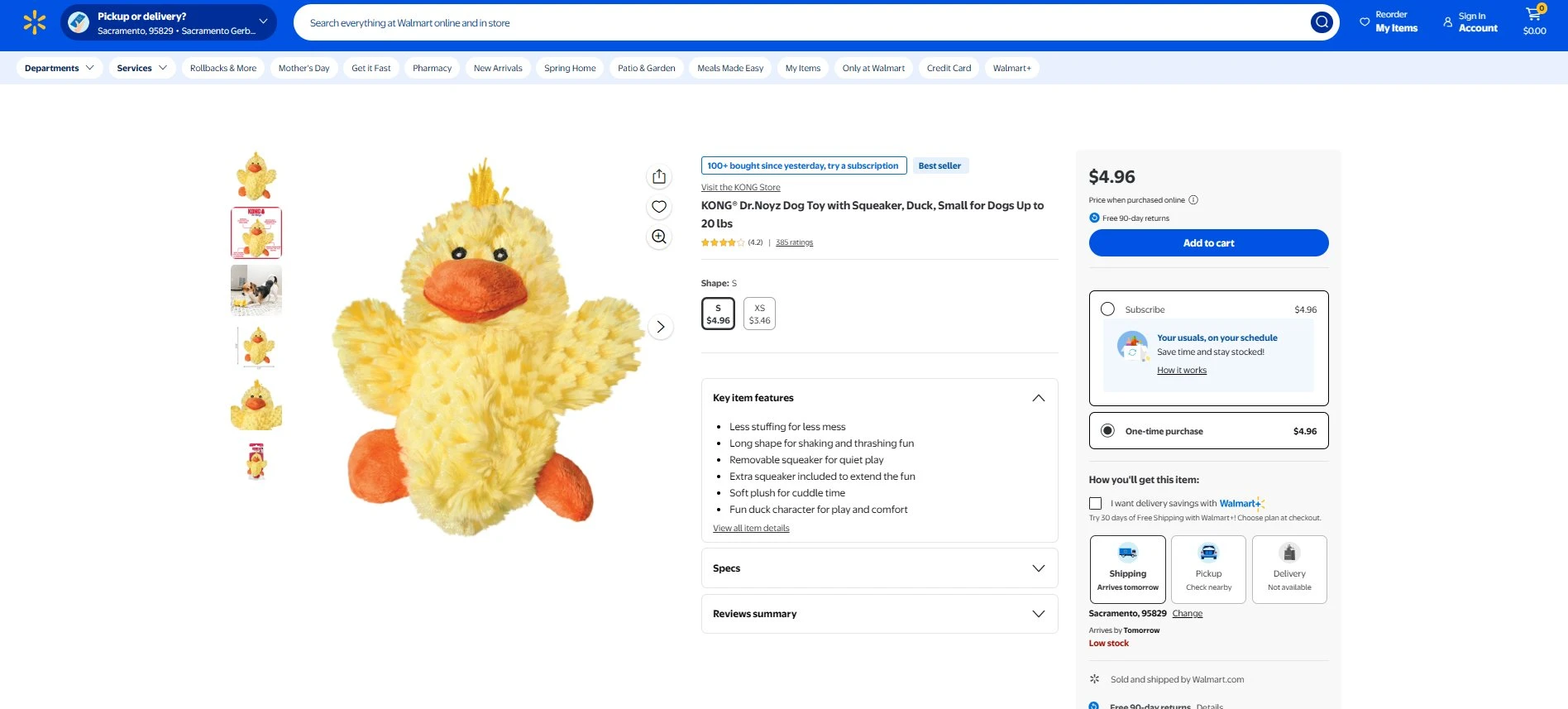
A typical Walmart product page: price, shipping options, stock status, and ratings are all JavaScript-rendered
3. How ScrapingBot handles them
ScrapingBot's Retail API abstracts all of this complexity behind a single POST request. Under the hood it:
- Rotates residential IPs with configurable geo-targeting (US ZIP code level)
- Renders JavaScript via a real browser engine before extracting data
- Manages session cookies automatically across requests
- Falls back to an advanced browser mode (
Trybrowser) when standard rendering is blocked - Returns a structured JSON object — no HTML parsing required on your end
The result: you send a URL, you get clean product data. No Puppeteer, no proxy management, no CAPTCHA solving infrastructure to maintain.
4. Step-by-step: scraping a Walmart product page
Prerequisites
pip install requestsYou'll need a ScrapingBot account and your API credentials (USERNAME and API_KEY) from your dashboard.
Basic request — single product page
import requests
USERNAME = "your_username"
API_KEY  = "your_api_key"
# Example: KONG Dr.Noyz Duck Dog Toy
TARGET_URL = "https://www.walmart.com/ip/KONG-Dr-Noyz-Duck-Dog-Toy/123456789"
def scrape_walmart(url):
    api_url = "https://api.scraping-bot.io/scrape/retail"
    payload = {"url": url}
    response = requests.post(
        api_url,
        json=payload,
        auth=(USERNAME, API_KEY)
    )
    if response.status_code == 200:
        return response.json()
    else:
        raise Exception(f"Error {response.status_code}: {response.text}")
data = scrape_walmart(TARGET_URL)
print(data)
Scraping multiple products (batch loop)
When monitoring a list of SKUs, iterate with a polite delay to stay within rate limits:
import requests, time
USERNAME = "your_username"
API_KEY  = "your_api_key"
PRODUCT_URLS = [
    "https://www.walmart.com/ip/Product-A/111111111",
    "https://www.walmart.com/ip/Product-B/222222222",
    "https://www.walmart.com/ip/Product-C/333333333",
]
def scrape_walmart(url):
    response = requests.post(
        "https://api.scraping-bot.io/scrape/retail",
        json={"url": url},
        auth=(USERNAME, API_KEY)
    )
    response.raise_for_status()
    return response.json()
results = []
for url in PRODUCT_URLS:
    try:
        data = scrape_walmart(url)
        results.append(data)
        print(f"OK: {url}")
    except Exception as e:
        print(f"FAILED: {url} — {e}")
    time.sleep(1)
print(f"\nCollected {len(results)} products")
Parsing the response
Once you have the raw JSON, extract and normalise the fields you need:
def parse_product(raw):
    d = raw.get("data", {})
    return {
        "title":         d.get("title"),
        "price":         d.get("price"),
        "currency":      d.get("currency"),
        "shipping_fees": d.get("shippingFees"),
        "in_stock":      d.get("isInStock"),
        "description":   d.get("description"),
        "image_url":     d.get("image"),
        "brand":         d.get("brand"),
        "category":      d.get("category"),
        "ean13":         d.get("EAN13"),
        "asin":          d.get("ASIN"),
        "site_url":      d.get("siteURL"),
    }
data = scrape_walmart(TARGET_URL)
product = parse_product(data)
print(product)
5. JSON response structure
Here is the structure returned by the ScrapingBot Retail API for a Walmart product page. All fields are consistently present across product categories — their values may be null when the data is not available on the page:
Raw JSON response from ScrapingBot — note the consistent field schema regardless of product category
| Field | Example value | Type |
|---|---|---|
| title | KONG® Dr.Noyz Dog Toy with Squeaker, Duck, Small | string |
| price | 4.96 | float |
| currency | USD | string |
| shippingFees | 0 | float |
| isInStock | true | boolean |
| description | Less stuffing for less mess… | string |
| image | https://i5.walmartimages.com/… | string |
| brand | KONG | string |
| category | Pets / Dog Toys | string |
| EAN13 | 0035585494102 | string |
| ASIN | null | null |
| ISBN | null | null |
| color | null | null |
| siteURL | https://www.walmart.com/ip/… | string |
| statusCode | 200 | integer |
shippingFees field returns 0 for free delivery, not null. Always check isInStock alongside shippingFees — an out-of-stock product may still return a price from a cached page state.
6. Error handling & the Trybrowser fallback
When Walmart's anti-bot layer blocks the standard rendering pipeline, the API returns an error: "Trybrowser" flag in the response body alongside an empty data object. This is not a hard failure — it's a signal to retry the request with the advanced browser option enabled:
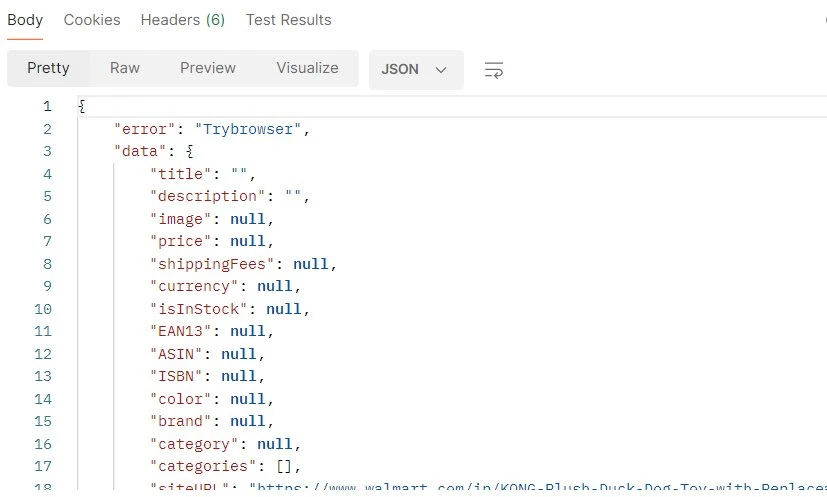
A Trybrowser response: all data fields are null — the page was blocked before rendering completed
Here's how to handle it programmatically:
def scrape_walmart_robust(url, use_browser=False):
    payload = {"url": url}
    if use_browser:
        payload["optionsToBrowser"] = True  # enables advanced browser mode
    response = requests.post(
        "https://api.scraping-bot.io/scrape/retail",
        json=payload,
        auth=(USERNAME, API_KEY)
    )
    response.raise_for_status()
    return response.json()
def get_product(url):
    data = scrape_walmart_robust(url)
    # Detect Trybrowser fallback signal
    if data.get("error") == "Trybrowser":
        print("Standard render blocked — retrying with browser mode…")
        data = scrape_walmart_robust(url, use_browser=True)
    return parse_product(data)
product = get_product(TARGET_URL)
print(product)Trybrowser error rather than applying it globally.
7. Use cases & going further
Once you have a reliable data pipeline from Walmart, here are common patterns to build on top of it:
- Price monitoring dashboard — store snapshots in PostgreSQL or TimescaleDB, query price deltas over time, and trigger alerts when a competitor drops below your threshold.
- Catalog synchronisation — use the
image,title, anddescriptionfields to auto-enrich your own product catalog or PIM system. - Stock availability tracking — poll high-demand SKUs at regular intervals and log
isInStocktransitions to understand restocking patterns. - EAN13-based cross-marketplace comparison — match products across Amazon, Target, and Walmart using the
EAN13field as a universal key.
ScrapingBot's Retail API supports Amazon, Target, Best Buy, and other major North American retailers with the same interface — making it straightforward to extend your scraper to multiple sources without reworking your parsing logic.
Ready to build your Walmart price monitor? Get 1,000 free API calls when you sign up for ScrapingBot.
Try ScrapingBot for free →