



Looking for a Bien'ici scraper Python guide? The French real estate market moves fast. Whether you're tracking price trends, monitoring competitor listings, or building a data pipeline, this guide shows you how to extract structured property data at scale from Bien'ici using ScrapingBot's API.
Table of contents
1. Why scrape Bien'ici?
Bien'ici is one of France's leading real estate portals, with tens of thousands of active listings at any given time — apartments, houses, new developments, rentals. It is used by buyers, sellers, agents, and investors alike. Scraping it gives you access to:
- Price history and market trends by neighbourhood or postal code
- Listing density and time-on-market data
- Rental vs. sale inventory ratios by geographic area
- Competitor agency activity and their mandates
- DPE data (energy class, GHG emissions) for environmental performance analysis
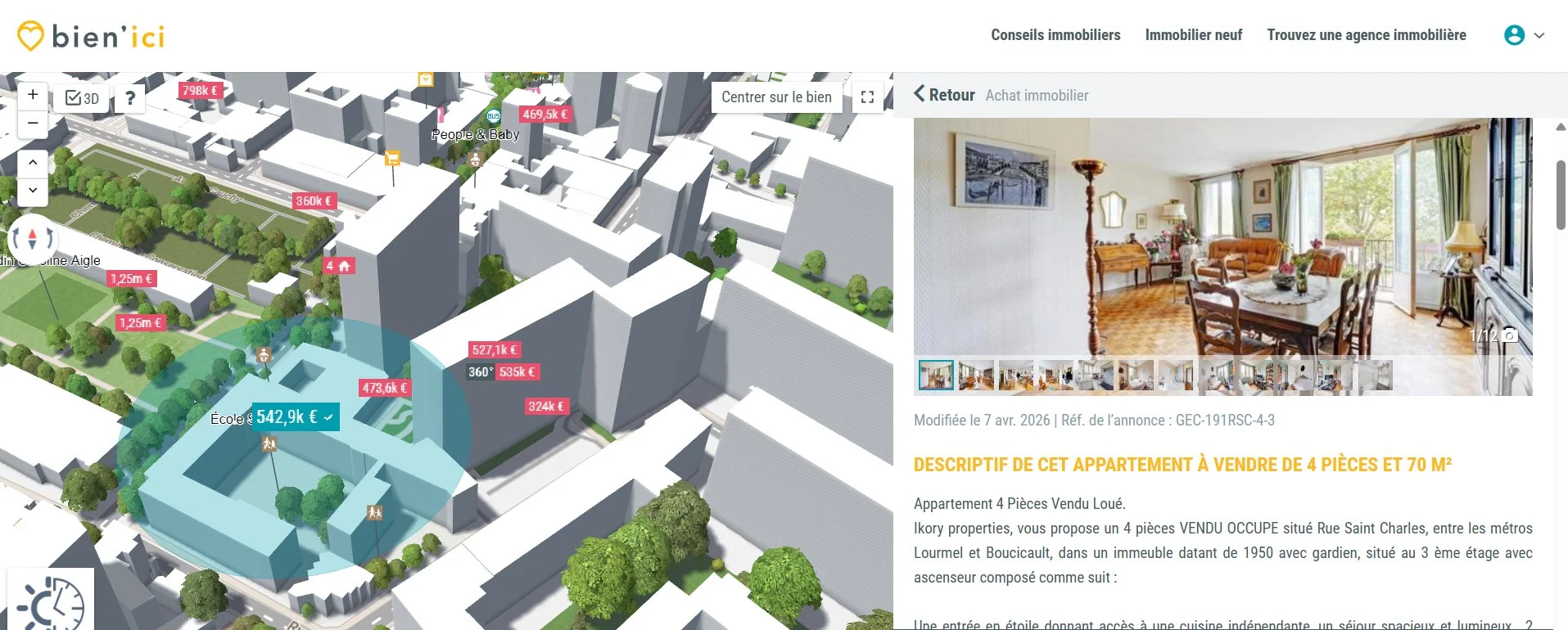
A Bien'ici listing: interactive 3D map and property detail (Paris 15th, €542,900, 70 m²)
2. Technical challenges
Before diving into the code, it's important to understand why scraping Bien'ici isn't as simple as a basic HTTP request:
- Anti-bot protection — Bien'ici detects headless browsers and blocks requests with suspicious headers.
- JavaScript rendering — Listing data is loaded dynamically, so basic HTTP requests won't capture it.
- IP rate limiting — Too many requests from one IP triggers temporary bans.
- Pagination — Search results span many pages that need systematic traversal.
- Listing identifiers — Bien'ici URLs use internal IDs (e.g.
ag756375-491979461) that require specific handling.
3. How ScrapingBot handles them
ScrapingBot's Real Estate API abstracts all of this complexity: it rotates IPs automatically, renders JavaScript, and returns clean structured JSON — no browser automation needed on your end. The result of your Bien'ici scraper Python calls is a ready-to-use data object containing title, price, surface area, number of rooms, energy class, and much more.
4. Step-by-step: build your Bien'ici scraper Python
Install the library
pip install requestsBasic request — scraping a single listing
import requests

# Your ScrapingBot credentials
USERNAME = "your_username"
API_KEY  = "your_api_key"

# The Bien'ici listing you want to scrape
TARGET_URL = "https://www.bienici.com/annonce/achat/paris-15e-arrondissement_75015/appartement/ag756375-491979461"

def scrape_bienici(url):
    api_url = "https://api.scraping-bot.io/scrape/real-estate"
    payload = {"url": url}

    response = requests.post(
        api_url,
        json=payload,
        auth=(USERNAME, API_KEY)
    )

    if response.status_code == 200:
        return response.json()
    else:
        raise Exception(f"Error {response.status_code}: {response.text}")

data = scrape_bienici(TARGET_URL)
print(data)
Scraping multiple listings (with pagination)
Bien'ici structures its search URLs with a page parameter. Here's how to iterate through multiple pages and aggregate results:
import requests, time

# Search: apartments for sale in Paris, page by page
BASE_SEARCH = "https://www.bienici.com/recherche/achat/paris-75/appartement?page={page}"

def scrape_pages(n_pages=5):
    results = []
    for page in range(1, n_pages + 1):
        url = BASE_SEARCH.format(page=page)
        data = scrape_bienici(url)
        listings = data.get("listings", [])
        results.extend(listings)
        print(f"Page {page} — {len(listings)} listings retrieved")
        time.sleep(1)  # polite delay between requests
    return results

listings = scrape_pages(n_pages=3)
print(f"Total collected: {len(listings)} listings")
Extracting and cleaning the JSON data
Once the response is retrieved, here's how to access the key fields and store them cleanly:
def parse_listing(raw):
    d = raw.get("data", {})
    return {
        "title":         d.get("title"),
        "price":         d.get("price"),
        "currency":      d.get("currency"),
        "surface_m2":    d.get("surfaceArea"),
        "rooms":         d.get("numberOfRooms"),
        "bedrooms":      d.get("numberOfBedrooms"),
        "energy_class":  d.get("energyClass"),
        "ghg_class":     d.get("greenhouseGazClass"),
        "monthly_rent":  d.get("monthlyRent"),
        "insee_code":    d.get("codeInsee"),
        "listing_url":   d.get("siteURL"),
    }

# Example usage
data = scrape_bienici(TARGET_URL)
listing = parse_listing(data)
print(listing)
5. Sample output data
Here's what a typical response looks like for a Bien'ici listing — in this case a 4-room, 70 m² apartment in the 15th arrondissement of Paris:
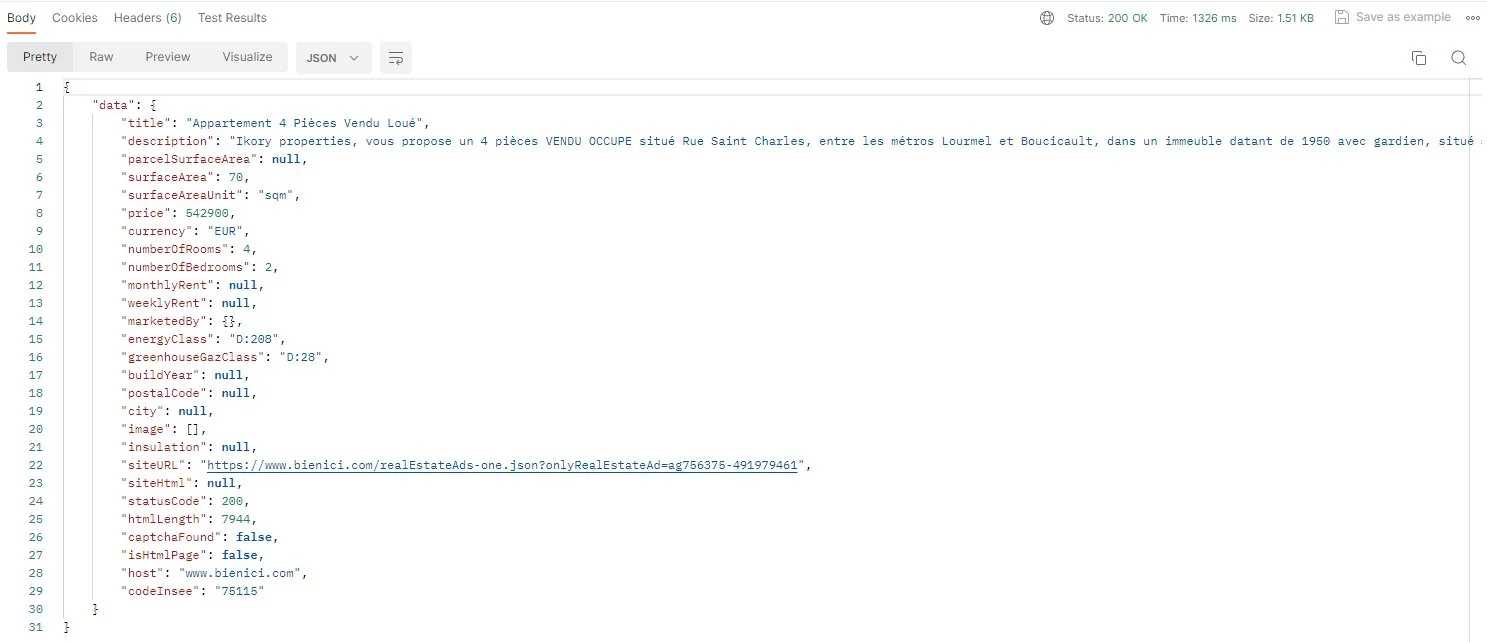
JSON response returned by ScrapingBot: structured data ready to use (status 200, no captcha detected)
| Field | Example value | Type |
|---|---|---|
| title | 4-Room Apartment — Tenanted Sale | string |
| price | 542900 | integer |
| currency | EUR | string |
| surfaceArea | 70 | integer |
| surfaceAreaUnit | sqm | string |
| numberOfRooms | 4 | integer |
| numberOfBedrooms | 2 | integer |
| energyClass | D:208 | string |
| greenhouseGazClass | D:28 | string |
| monthlyRent | null | null |
| codeInsee | 75115 | string |
| host | www.bienici.com | string |
| statusCode | 200 | integer |
| captchaFound | false | boolean |
| siteURL | https://www.bienici.com/realEstateAds-one.json?… | string |
energyClass field returns the raw DPE value (e.g. D:208), letting you extract both the letter rating and the kWh/m²/year figure for comparative analysis.
6. Going further
Once you have the raw data from your Bien'ici scraper Python script, you can pipe it into a CSV with pandas, store it in a PostgreSQL database, or feed it into a price-trend dashboard by arrondissement. You can also cross-reference it with sources such as DVF (Demandes de Valeurs Foncières) data for in-depth market analysis.
ScrapingBot also supports SeLoger, Leboncoin Immobilier, PAP, and other French portals via the same API interface — ideal for building a multi-source aggregator.
Ready to try it? Get 1,000 free API calls when you sign up for ScrapingBot.
Try ScrapingBot for free →